---
title: Legge til/fjerne BagID 2 i Samsung SmartThings Find
description: "Open the SmartThings app \nPress the right button once or twice. You will hear a beep to confirm that SmartThings Find has been enabled"
---
[Gå til innhold](https://helpcenter.bagid.com/no-no/legge-til-fjerne-bagid-2-i-samsung-smartthings-find#main-content)
- [Norsk – Norge](https://helpcenter.bagid.com/no-no/legge-til-fjerne-bagid-2-i-samsung-smartthings-find)
- [Deutsch](https://helpcenter.bagid.com/de/hinzufügen/entfernen-der-bagid-in-samsung-smartthings-find)
- [English](https://helpcenter.bagid.com/en/add-remove-the-bagid2-to-samsung-smartthings)
Norsk – Norge
Vis undermeny for oversettelser
[Mer støtte](https://helpcenter.bagid.com/no-no/kb-tickets/new?hsLang=no-no)
![bagID\_logo\_green\_trd.mark.png\]](https://helpcenter.bagid.com/hs-fs/hubfs/bagID_logo_green_trd.mark.png?height=45&name=bagID_logo_green_trd.mark.png)
Åpne hovednavigasjon
Lukk hovednavigasjon
- - [Norsk – Norge](https://helpcenter.bagid.com/no-no/legge-til-fjerne-bagid-2-i-samsung-smartthings-find)
- [Deutsch](https://helpcenter.bagid.com/de/hinzufügen/entfernen-der-bagid-in-samsung-smartthings-find)
- [English](https://helpcenter.bagid.com/en/add-remove-the-bagid2-to-samsung-smartthings)
Norsk – Norge
Vis undermeny for oversettelser
- [Mer støtte](https://helpcenter.bagid.com/no-no/kb-tickets/new)
- Gå til bagid.com
Gå til bagid.com
Hvordan kan vi hjelpe deg?
- Det finnes ingen forslag fordi søkefeltet er tomt.
1. [Hjelpesenter](https://helpcenter.bagid.com/no-no?hsLang=no-no)
2. [BagID 2](https://helpcenter.bagid.com/no-no/bagid-2?hsLang=no-no)
3. [Sporing - Samsung SmartThings Find](https://helpcenter.bagid.com/no-no/bagid-2?hsLang=no-no#sporing-samsung-smartthings-find)
# Legge til/fjerne BagID 2 i Samsung SmartThings Find
## Lær hvordan du legger til eller fjerner BagID 2 fra SmartThings-appen.
Før du kan legge til din BagID 2 i SmartThings Find, så må du [aktivere SmartThings Find-funksjonaliteten på BagID 2](https://helpcenter.bagid.com/no-no/aktiver/deaktiver-samsung-smartthings-find-p%C3%A5-bagid-2?hsLang=no-no). **Denne fremgangsmåten vil ikke fungere dersom du ikke har åpnet enheten din opp for sporing.**
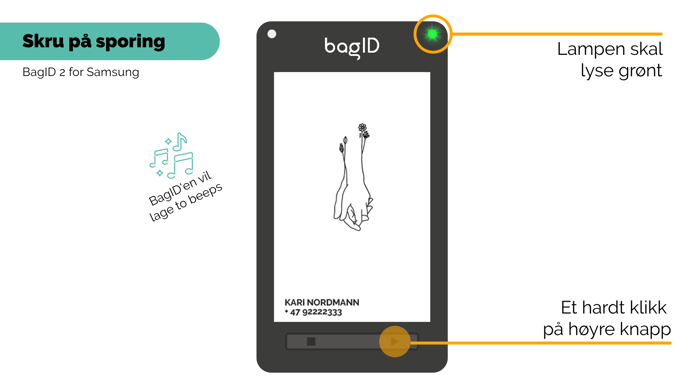
### Legge til BagID 2 i SmartThings Find-appen
-  Åpne SmartThings Find-appen på din telefon
- Vanligvis vil appen registrere at BagID 2 er i nærheten og vil varsle deg med en pop-up beskjed
- Trykk på 'Legg til nå'
- Gi SmartThings Find tillatelse til å bruke din lokasjonsinformasjon.
- Trykk én gang på høyre knapp på BagID'en
- Alternativt kan du scanne QR-koden på baksiden av BagID'en din med mobilkameraet og deretter følge instruksene i SmartThing Find-appen
Dersom du ikke parer BagID'en din med SmartThings Find-appen innen 5 minutter, vil sporingsfunksjonaliteten på BagID'en skru seg av. Du vil høre tre pip når den skrur seg av. Ønsker du å legge til BagID'en, må du skru på sporingen på nytt.
**Se gjerne vår videoguide her for hvordan du aktiverer SmartThings Find på BagID 2 og legger den til i SmartThings-appen:**
### Hvordan fjerne BagID 2 fra SmartThings Find-appen
- Åpne SmartThings Find appen
- Finn BagID'en i listen over enheter
- Trykk og hold inne på BagID-ikonet
- Trykk på 'Fjern' (illustrert med en søppelbøtte)
- [FAQ](https://helpcenter.bagid.com/no-no/faq?hsLang=no-no)
- [Kom i gang](https://helpcenter.bagid.com/no-no/kom-i-gang?hsLang=no-no)
- [Tekniske utfordringer](https://helpcenter.bagid.com/no-no/tekniske-utfordringer?hsLang=no-no#main-content)
- [Generelt](https://helpcenter.bagid.com/no-no/tekniske-utfordringer?hsLang=no-no#generelt)
- [BagID appen](https://helpcenter.bagid.com/no-no/tekniske-utfordringer?hsLang=no-no#bagid-appen)
- [Batteri og lading](https://helpcenter.bagid.com/no-no/tekniske-utfordringer?hsLang=no-no#batteri-og-lading)
- [Sporing](https://helpcenter.bagid.com/no-no/tekniske-utfordringer?hsLang=no-no#sporing)
- [Abonnement](https://helpcenter.bagid.com/no-no/tekniske-utfordringer?hsLang=no-no#abonnement)
- [Reiseutfordringer](https://helpcenter.bagid.com/no-no/reiseutfordringer?hsLang=no-no)
- [BagID 2](https://helpcenter.bagid.com/no-no/bagid-2?hsLang=no-no#main-content)
- [Generelt](https://helpcenter.bagid.com/no-no/bagid-2?hsLang=no-no#generelt)
- [Elektronisk bagasjetag](https://helpcenter.bagid.com/no-no/bagid-2?hsLang=no-no#elektronisk-bagasjetag)
- [Sporing - Apple Hvor er?](https://helpcenter.bagid.com/no-no/bagid-2?hsLang=no-no#sporing-apple-hvor-er)
- [Sporing - Samsung SmartThings Find](https://helpcenter.bagid.com/no-no/bagid-2?hsLang=no-no#sporing-samsung-smartthings-find)
- [Batteri og lading](https://helpcenter.bagid.com/no-no/bagid-2?hsLang=no-no#batteri-og-lading)
- [BagID-app](https://helpcenter.bagid.com/no-no/bagid-app?hsLang=no-no)
- [Tilbehør](https://helpcenter.bagid.com/no-no/tilbeh%C3%B8r?hsLang=no-no)
- [Abonnement](https://helpcenter.bagid.com/no-no/abonnement?hsLang=no-no)
- [Ordrerelatert](https://helpcenter.bagid.com/no-no/ordrerelatert?hsLang=no-no#main-content)
- [Kjøp](https://helpcenter.bagid.com/no-no/ordrerelatert?hsLang=no-no#kj%C3%B8p)
- [Frakt og levering](https://helpcenter.bagid.com/no-no/ordrerelatert?hsLang=no-no#frakt-og-levering)
- [Toll og moms](https://helpcenter.bagid.com/no-no/ordrerelatert?hsLang=no-no#toll-og-moms)
- [Retur](https://helpcenter.bagid.com/no-no/ordrerelatert?hsLang=no-no#retur)
- [B2B](https://helpcenter.bagid.com/no-no/ordrerelatert?hsLang=no-no#b2b)
[](https://www.bagid.com)
BagID Hjelpesenter
Opphavsrett © 2026, BagID AS